

phpcms v9搜索功能怎么做?phpcmsv9 全站搜索功能如何实现
给大家分享一下如何运用搜索功能吧,
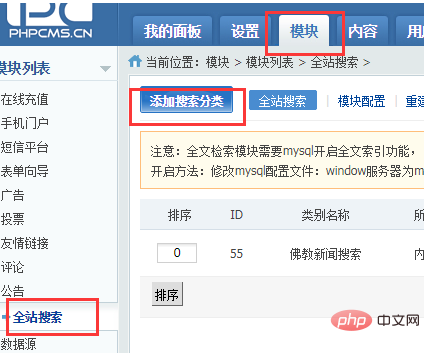
1. 首先, 模块->全站搜索->添加搜索分类,添加搜索分类,此时生成的ID为typeid
立即学习“PHP免费学习笔记(深入)”;
2. 添加form表单,此时的typeid即为上图的id,siteid为站点的id
<form method="get" action="{APP_PATH}index.php" target="_blank"> <td width="">搜索:</td> <td width=""> <input type="text" name="q" id="q" value="" class="inputCom" style="width:196px; height:22px; line-height:22px;"> <input type="hidden" name="m" value="search"/> <input type="hidden" name="c" value="index"/> <input type="hidden" name="a" value="init"/> <input type="hidden" name="typeid" value="{$typeid}" id="typeid"/> <input type="hidden" name="siteid" value="{$siteid}" id="siteid"/> </td> <td width=""><input type="image" src="{IMG_PATH}sousuo.jpg" border="0" class="sousuo" id="search_btn"></td></form>
3.修改搜索页面 phpcms\templates\default\search\list.html
{pc:get sql="SELECT * FROM `表名` where title like ‘%$q%’ order by id DESC " num="10" page="$page" return="data"} {loop $data $r} <tr> <td width="500" align="left" style="margin-top:2px; ">· <a href="{$r[url]}" title="{$r[title]}" class="centerTitle" style="text-decoration:none" >{$r[title]}</a></td> <td width="200" align="right" style="color:#FF6600;margin-top:2px;">{date(‘Y-m-d’,$r[inputtime])}</td> </tr> {/loop} {if empty($data)}未找到结果{/if} <div class="pages">{$pages}</div>{/pc}
此时,搜索页面就可以了。
PHP中文网,大量的免费PHPCMS教程,欢迎在线学习!

评论(0)